Sonos
- 4.3
- Rating
- 10.00M
- Installs
- Free
- Price

 Analysis by App-foxy
I usually judge a music app by what happens after the first few minutes of setup. Can it help me choose the right sound for the room, keep playback under control, and stay out of the way when I am doing something else? Sonos is built for that particular job. It is the official control app from Sonos, Inc., and its value depends heavily on whether you already use Sonos speakers or are thinking about building a listening setup around them.
This is not a general music-making studio, an audio editor, or a publishing tool for creators. I would describe it as a central workspace for starting, shaping, and handing off listening sessions across a Sonos system. That distinction matters. If your goal is to record vocals, cut a podcast, master a track, or publish a song, this is the wrong kind of app. If your goal is to make music playback feel organized throughout a home, it becomes much more relevant.
The app is free and suitable for Everyone, which makes trying it straightforward. It has reached over ten million installs, with an average rating of 4.2 from around 315 thousand ratings and about 21 thousand written reviews. Those figures suggest a mature, widely used companion rather than a niche remote control, although popularity does not remove the need to check whether its workflow matches your equipment and habits.
You May Also Like

 Blood Strike: 2.5 Anniversary
Blood Strike’s Loadouts Turn Every Drop Into a Tactical Gamble
A close look at Blood Strike’s custom loadouts: how fast access to signature weapons reshapes its battle royale rhythm, rewards preparation, and narrows the gap between fights.

 Pandora - Music & Podcasts
Pandora’s Music Is Easy to Start, but Harder to Recover
Pandora’s strength is its low-effort path from a seed to a station. Its weak spot is how much confidence it asks you to place in connection, setup, and quiet recovery.

 8 Ball Pool
 Is Built on Rivalries, Rematches, and Routine
A close look at the rivalries, rematches, shared routines, and unanswered safety questions that turn a quick pool match into a persistent mobile community.

 Samsung Music
’s Quiet Strength Is Playing What You Already Own
Its reach comes less from spectacle than from dependable access to a personal library. That simplicity is both the app’s strongest retention engine and its ceiling.

 AccuWeather: Weather Radar
AccuWeather Review: A Quick, Clear Forecast for Everyday Decisions
For everyday plans, the best forecast is the one you can understand quickly. AccuWeather makes rain timing, radar, and local conditions easy to act on, with a few trade-offs.

 Hill Climb Racing
Why Hill Climb Racing Still Turns Crashes Into One More Run
A tiny car, a bumpy hill and one more upgrade: Hill Climb Racing keeps resurfacing because its simple chaos makes every near-miss feel personal.
More From Our News Desk



From a listening idea to a room that feels ready
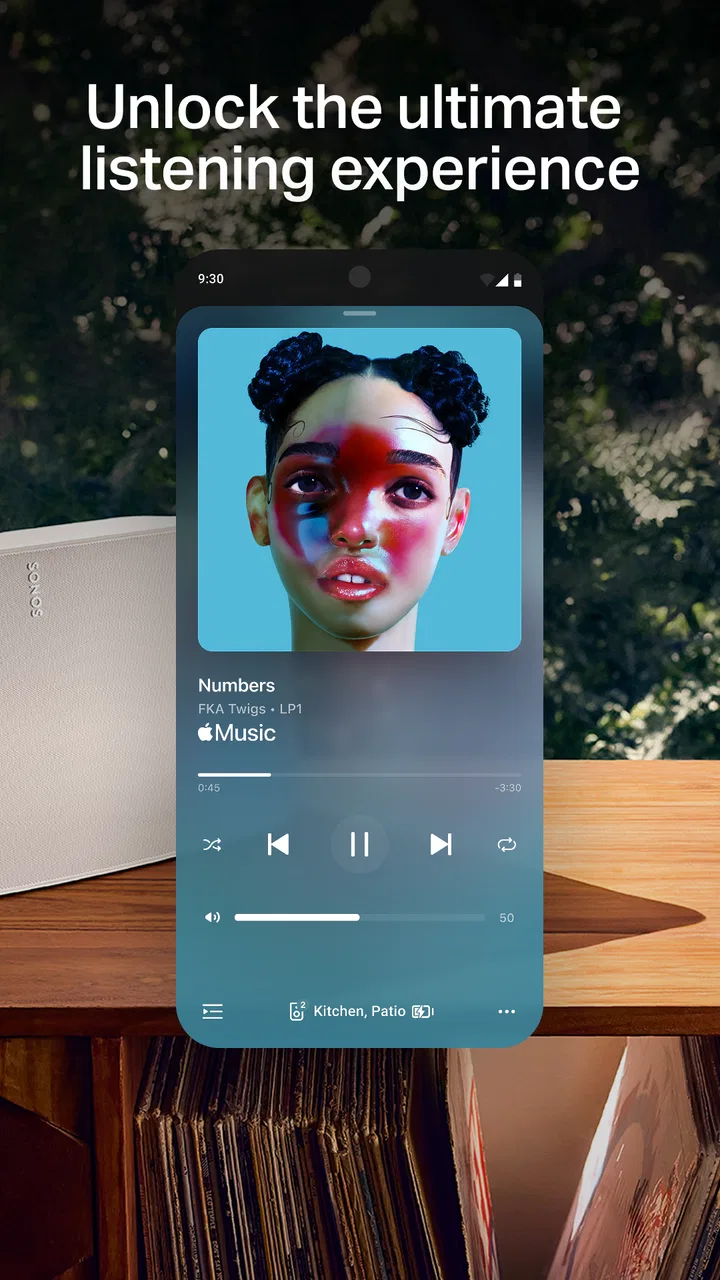
The creative starting point here is not a blank canvas. Instead, I begin with an intention such as “quiet background music in the kitchen,” “a fuller sound for the living room,” or “the same playlist throughout the house.” The app is useful because it turns that intention into a playback arrangement. I can think in terms of rooms and listening zones rather than treating every speaker as a separate device.
That room-based approach is the first important difference from using a phone’s ordinary music player. A standard player is usually centered on one device and one output. Sonos is centered on a connected speaker environment. When the system is already arranged properly, the app makes the home feel like one audio workspace, with each room available as part of the decision.
I find this especially helpful when several people share the same space. Instead of passing around a speaker or repeatedly changing Bluetooth connections, I can select where the audio should go and then return to the music itself. It is a small change in behavior, but it removes the interruptions that often make casual listening feel more complicated than it should.
The trade-off appears immediately: the app makes the most sense with Sonos hardware. Someone who only wants to play music through a phone, wired headphones, or an ordinary Bluetooth speaker will gain little from installing it. The free download does not turn a conventional audio setup into a Sonos system, so the practical value is tied to the devices in the home.
For a realistic everyday example, imagine preparing dinner while a playlist is already playing in the living room. I can bring the sound into the kitchen, keep the music going while moving between rooms, and later return playback to the original space. That is a better use case than simply asking whether the app has a large music catalog. Its strength is orchestration: deciding where listening happens and keeping that decision manageable.
Choosing the right starting point
I recommend beginning with the room rather than the song. First decide where you want audio, then choose what to play and how broadly it should be distributed. This avoids a common frustration in multi-room systems: starting playback on one speaker and only afterward trying to reconstruct the arrangement you actually wanted.
It also helps to treat each room as a different listening context. A space used for conversation may need a lighter background session, while a dedicated listening area may be where I want more focused playback. The app does not replace judgment about volume, acoustics, or speaker placement, but it gives me a practical control point for those choices.
One non-obvious benefit is that this setup encourages more deliberate handoff between activities. I can start with low-key music while working, expand playback when friends arrive, and then narrow it again later. The app is not creating the audio content, but it helps me shape the conditions in which that content is experienced.
How the playback-making process feels in practice
Once I have chosen a listening area, the making process is mostly about assembling a session. I select audio, decide which rooms should participate, and adjust the arrangement as the day changes. That may sound simple, but simplicity is exactly what I want from a remote control. I do not want to manage a technical console every time I need to move music from one part of the home to another.
The interface works best when I already know the broad direction of the session. If I am looking for a specific artist, album, or playlist, I can focus on that choice. If I am browsing without a clear idea, the experience depends more on the music services connected to my listening routine than on Sonos itself. In other words, this app is strongest as a playback organizer, not necessarily as my only source of discovery.
That distinction is important for anyone comparing it with a normal streaming application. A streaming app is often designed around recommendations, personal libraries, social features, and discovery. Sonos is designed around getting selected audio into the right speakers. I would use the former to explore and the latter to coordinate the listening environment, especially when the household includes multiple rooms.
There is also a useful separation between content choice and output choice. I can think about what I want to hear without treating the destination as a permanent decision. This makes the workflow more flexible than a single-device player, particularly when I am carrying out chores and the desired listening area keeps changing.
A practical routine for shared homes
In my experience, the smoothest routine is to establish a small number of dependable habits. I choose the room or group first, begin playback, and make later changes from the current session rather than starting over. I also try to avoid making several room changes at once while people are talking or moving around; a deliberate change is easier to verify than a rushed chain of taps.
For households with different preferences, I would agree on simple conventions. One person can manage the main room while another uses a separate space, rather than treating the entire home as one permanent audio zone. This is less about a hidden feature and more about using the app’s central idea intelligently: rooms should reflect how people actually live, not just how the speakers were installed.
The friction is that a multi-room system introduces more decisions than a phone speaker. I sometimes have to pause and check whether I am changing the current room, a group, or the broader listening arrangement. That is manageable, but anyone seeking instant one-tap playback may prefer a simpler Bluetooth setup.
Where creators should and should not use it
The editorial angle of making and delivering creative work needs a careful interpretation here. I can use the app as a reference-listening tool while checking how a finished track, mix, or spoken piece feels in a real room. That can be valuable because a production that sounds balanced on headphones may feel different when played through a home speaker system.
However, I would not use it as the main production environment. It does not replace a digital audio workstation, a recorder, an editor, or a publishing platform. There is no reason to expect a workflow for cutting clips, arranging tracks, adding effects, rendering a master, or sending a finished file to an audience. For those tasks, I would move to specialized software and use Sonos only for listening and room-based checking.
That limitation is actually useful to understand before downloading. The app can sit near the end of a creative process, where I review a completed piece in an everyday environment, but it is not the place where the piece is made. If I am a musician, podcaster, video editor, or sound designer, I see it as a playback destination and evaluation aid rather than a creation suite.
Iteration: changing the session without losing the thread
Good playback control is mostly about iteration. Plans change: a phone call starts, guests move to another room, a song does not fit the mood, or I decide that background audio should become a focused listening session. Sonos is useful when I can make those changes without rebuilding the entire experience from the beginning.
The room-based model gives iteration a physical logic. Instead of thinking only in terms of next track and previous track, I think about where the session belongs. That is a more realistic mental model for a home with several listening areas. It also makes the app feel less like a music library and more like a control surface for an audio environment.
One of my preferred habits is to make small changes and listen briefly before making another. This is particularly helpful when adjusting a group of rooms, because sound can feel different as I move through the home. A setting that works in one space may be too prominent in another. The app can direct playback, but my ears still need to make the final judgment.
This is one of the stronger non-obvious insights: multi-room convenience can encourage over-grouping. It is tempting to send everything everywhere because the option is available. In practice, separating rooms often produces a more comfortable result, especially when one person is working and another is watching something or having a conversation nearby.
Handling interruptions and handoffs
For everyday reliability, I care less about dramatic features than about recovery. If I stop listening for a while, I want to return to the session without feeling that the whole setup has become mysterious. I also want the destination to remain understandable when I move between rooms or change the scale of playback.
A useful workflow is to think of a session as having three stages: start it in one room, expand or narrow the audience as circumstances change, and finish by leaving the system in a sensible state for the next person. That final step is easy to overlook. In a shared home, ending playback cleanly is part of good handoff, just as much as starting it.
The app is less appealing if my listening is almost always private and local. If I use wired headphones at a desk or a single portable speaker, room management adds little. In that situation, the music service’s own app will usually be faster because it is closer to the content and does not ask me to think about a speaker network.
What the rating tells me, and what it does not
An average rating of 4.2 indicates that many users find the app worthwhile, but I would interpret that alongside the product’s specialized role. A person who owns several Sonos speakers may judge it as essential, while someone who downloaded it without that hardware may see no reason to keep it. The same app can therefore produce very different reactions depending on the surrounding setup.
The scale of adoption is reassuring in one narrow sense: this is not an obscure experiment. Sonos, Inc. has built an established companion for its audio ecosystem, and the app has more than ten million installs. Still, I would not treat install volume as a guarantee that every device, room arrangement, or personal listening habit will feel equally smooth.
Handoff, reference listening, and the limits of delivery
The export or handoff stage needs a precise definition. Sonos is not where I export a finished audio file. There is no sensible reason to choose it when I need to render a project, package stems, upload a podcast, or deliver a master to a client. Those jobs belong to the tools used to create and distribute the work.
Where it does help is the listening handoff: moving selected audio from a personal device or service into a shared speaker environment. That can be useful when demonstrating a track to someone in the same home, checking a video’s soundtrack on a larger system, or turning a private listening session into a room-wide one.
For a creator, I would use it after the technical export is complete. I would listen to the finished file through the home system, take notes elsewhere, return to the production software for corrections, and repeat the check. This creates a practical loop between controlled production and ordinary listening conditions. It is not a substitute for calibrated monitoring, but it can reveal whether the work remains convincing outside the studio mindset.
That workflow also exposes an important trade-off. A home speaker system may be more representative of casual listeners than studio monitors, but it is not a neutral reference by default. I would avoid making precise mastering decisions from this app alone. Use it to catch obvious balance, vocal clarity, low-end comfort, or overall mood issues, then confirm important changes with proper monitoring.
When another option is better
If I want the quickest possible route from a phone to one speaker, Bluetooth is often simpler. If I want discovery, recommendations, library management, and personal listening history, the dedicated streaming service may be the better primary app. If I want to edit or publish audio, professional creative software is the clear choice.
Sonos becomes the better option when the problem is distribution around the home. It is particularly convincing for people who regularly move between rooms, share speakers with family, or want a consistent way to manage several listening areas. The more often I need to coordinate destinations, the more its specialized design earns its place.
I would also think carefully before choosing it for a constantly changing collection of unrelated devices. The experience is most coherent when the speaker environment is already based on Sonos. If my equipment is mixed, temporary, or mostly portable, a broader audio-control approach may create less commitment and fewer points of friction.
My verdict for listeners and creative workflows
After using it as a working control tool, I see Sonos as a focused app with a clear strength: it makes multi-room listening easier to organize than a collection of disconnected playback methods. Its best moments come when I start with a room-based intention, adjust the session as life changes, and hand the sound from one part of the home to another without rebuilding everything.
I would recommend it to anyone who already owns Sonos speakers and wants a central way to manage them. It is also useful to creators who need a convenient real-world listening check after exporting a track, podcast, video, or other audio project. The app helps me evaluate how a finished piece behaves in an ordinary home context, even though it does not create or deliver that piece itself.
I would skip it if I only need a basic music player, private headphone listening, a single Bluetooth connection, or a full audio-production workflow. In those situations, its specialized room controls are more baggage than benefit. The free price is attractive, but the real investment is the surrounding Sonos ecosystem and the willingness to organize listening around rooms.
My final recommendation is therefore conditional but positive: choose Sonos when the room is part of the listening decision. That is where the app feels purposeful rather than redundant. It gives me a practical bridge between choosing audio and experiencing it throughout a home, with enough flexibility for everyday handoffs and creative reference checks. Just do not mistake that strength for editing, publishing, or studio production power; its job is to help finished audio reach the right place and feel at home there.
FAQs for Sonos
01What is Sonos and how does it work?
Sonos is a wireless home sound system that allows you to stream music, podcasts, and other audio content throughout your home. It connects via your home Wi-Fi network and can be controlled using the Sonos app. The system supports a wide range of music services and offers multi-room audio capabilities.
02Can I use Sonos with my existing audio equipment?
Yes, Sonos can integrate with existing audio equipment using the Sonos Port or Amp. These devices allow you to stream music to your existing speakers and make them part of the Sonos system, enabling seamless control via the app and sync with other Sonos speakers.
03Is the Sonos app available on both Android and iOS?
Yes, the Sonos app is available for both Android and iOS devices. It offers a user-friendly interface to control your Sonos system, manage music libraries, and access streaming services, ensuring a seamless experience across different mobile platforms.
04Does Sonos support voice control?
Yes, Sonos supports voice control through integrations with Amazon Alexa and Google Assistant. You can use voice commands to play music, adjust the volume, and control other compatible smart home devices, making it a versatile addition to your home automation setup.
05What streaming services are compatible with Sonos?
Sonos is compatible with a wide range of music streaming services, including Spotify, Apple Music, Amazon Music, Tidal, and more. The app allows you to easily add and switch between these services, ensuring you have access to all your favorite music in one place.
Pros
- Seamless multi-room audio experience.
- Wide range of streaming service support.
- User-friendly interface and setup.
- High-quality sound performance.
- Regular software updates enhance features.
Cons
- Expensive compared to other options.
- Limited Bluetooth functionality.
- Requires stable Wi-Fi for optimal use.
- No built-in voice assistant in some models.
- App can be sluggish on older devices.

Sonos
Gallery